02 Sep 2026
Engineering notes — retrieval infrastructure
A RAG application is only as good as what it has been allowed to read. We built one ingestion path that turns messy web pages, scanned insurance PDFs, and the charts buried inside them into clean, retrieval-ready chunks — validated against an independent model and graded run over run, not once.

Any chat application built on retrieval — an internal assistant, a customer-facing Q&A, a research copilot — is only ever as reliable as the documents it was allowed to read. In practice, those documents are never clean. Some live on a website as HTML. Some arrive as a 120-page PDF prospectus with a scanned signature page. Some carry the most important number in the whole document inside a bar chart, not a sentence. We set out to build one pipeline that could take in all three, and prove — with numbers, not vibes — that it was doing it well.
Web pages and PDFs fail in almost opposite ways. A scraped web page is full of structure that isn't content — cookie banners, "download our app" nags, navigation breadcrumbs — sitting right next to the paragraph you actually need. A PDF, especially the kind an insurer or a bank issues, is often the reverse problem: the structure is gone. Headings are just bigger text with no tag, tables are pixels, and a meaningful chunk of the real content — CAGR figures, premium tables, eligibility charts — exists only as an image on the page.
Why this matters for retrieval. A chunk that drops the page title becomes an orphan — technically retrievable, contextually meaningless. A chunk that keeps a cookie notice wastes a slot in the context window that a real answer needed. Both failures are invisible in a demo and expensive in production.
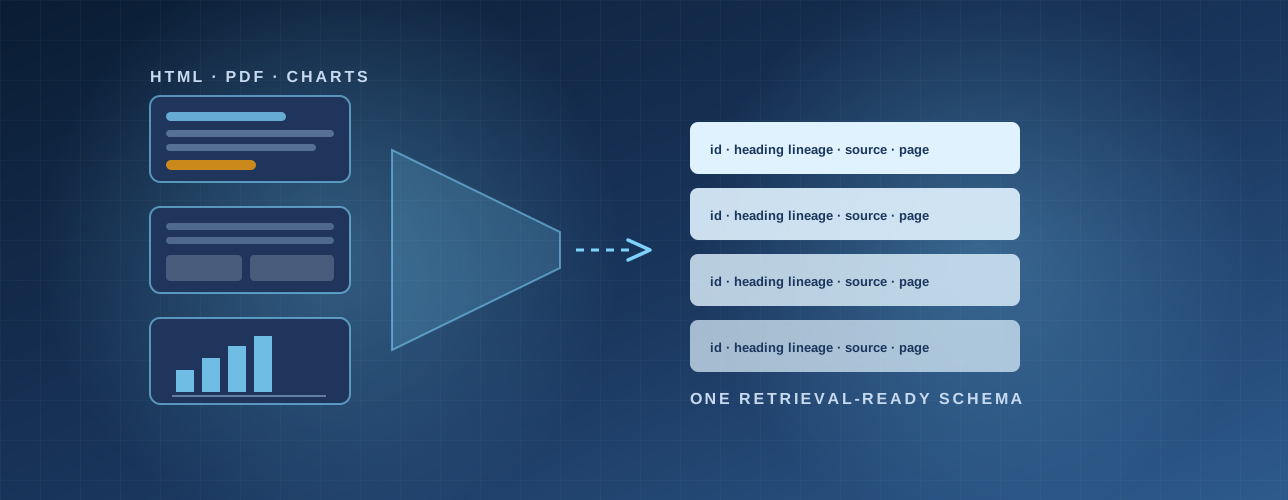
Rather than force web content and PDF content through the same code path, we built two purpose-built extraction pipelines that both resolve to the same downstream chunk shape — so anything sitting behind the pipeline (a vector store, a re-ranker, an eval harness) never has to know or care where a chunk originally came from.
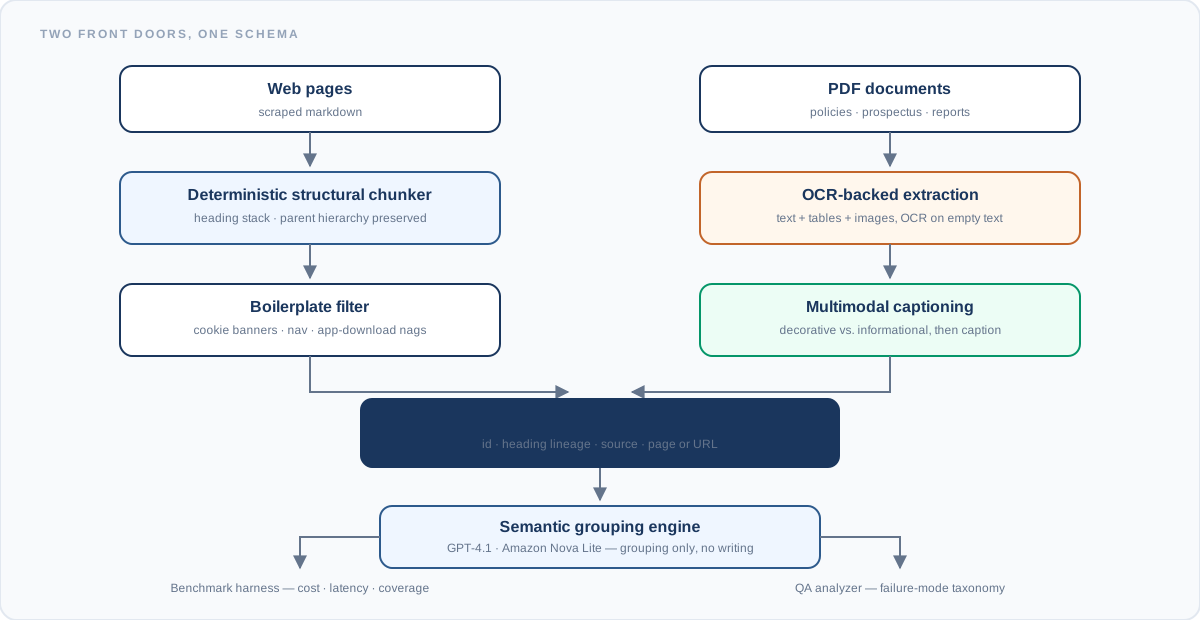
Figure 1 — Two extraction paths, one shared schema. Web and PDF content converge before the grouping stage, so downstream tooling never branches on source type.
None of this was built by one person in isolation, and none of it was built once and left alone. The pipeline moved constantly between exploratory notebook work and a harness other engineers needed to rerun without relearning it — and the way it was built reflects that.
Every stage — the web chunker, the OCR extraction path, the captioning filter, the benchmark runner — started as an interactive notebook and stayed runnable as one, rather than being rewritten into a separate "production version" that could drift from what was actually tested. The same notebook that prototyped a grouping prompt on five sample pages is the one that produced the benchmark numbers below — no translation step where behaviour could quietly change.
The web pipeline and the PDF pipeline were effectively built by different workflows, tuned against very different failure modes — boilerplate regex on one side, OCR fallback and chart classification on the other. What kept them from becoming two disconnected systems was agreeing on the output shape first: any chunk, from either path, carries the same id, heading lineage, and source reference. Neither side had to wait on the other to start indexing.
The stack spanned Python-based extraction scripts, OCR fallbacks, and vision-model captioning calls that needed rapid, iterative tuning — the kind of work that lives or dies on how fast you can look at the next failing example. Keeping everything in notebooks meant a new failure case could be isolated, inspected, and fixed in the same session it was found, instead of round-tripping through a deploy cycle.
A lot of pipeline tooling is optimised for one moment — either the exploratory pass where you're still discovering failure modes, or the locked-down version that runs on a schedule. This project needed both, often on the same document in the same week. Being able to prototype a captioning rule against one bad PDF and then fold it straight into the harness that graded five hundred pages, without a rewrite in between, shortened the distance between "this looks promising" and "this is the number we report."
The grouping stage is the one place a model gets creative licence, which is exactly where things go wrong quietly. We ran the same base chunks through GPT-4.1 and Amazon Nova Lite under an identical system prompt and temperature, then separately validated both pipelines' extraction output against Gemini 2.5 Pro, used as an independent reference reader of the same source pages — asked to read each document cold and report back the facts, tables, and figures it found, so we could check what our pipeline captured against what a second model, with no access to our chunk boundaries or prompts, considered present. Mismatches feed directly into the same failure-mode taxonomy used to grade the grouping stage, so a missed table and a hallucinated chunk ID are tracked as the same kind of finding, not two separate reports.
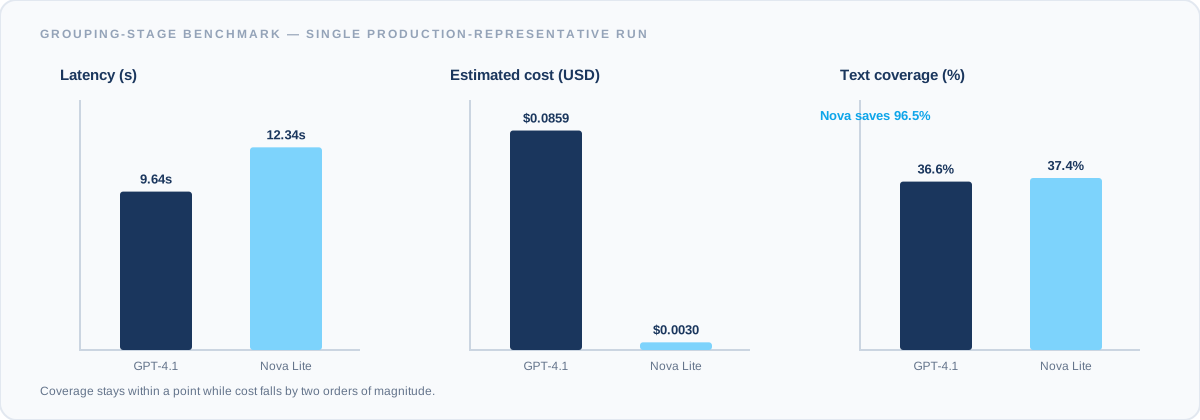
Figure 2 — Single production-representative run. Nova Lite landed at $0.003 against GPT-4.1's $0.086 — a 96.5% cost gap — while text coverage stayed within a point (37.4% vs 36.6%).
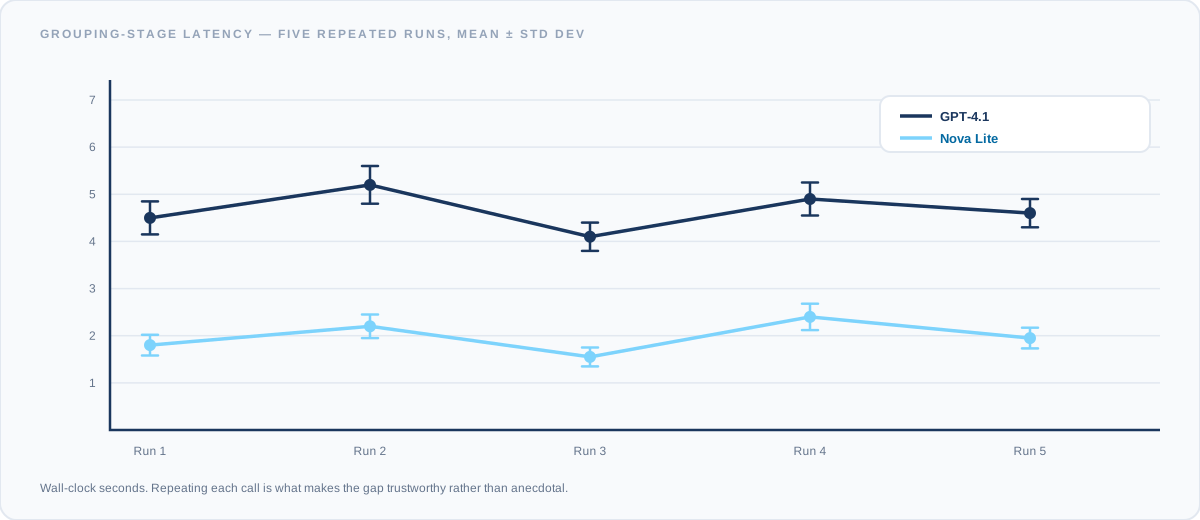
Figure 3 — Five repeated calls per model, not one. Nova Lite ran in roughly half the wall-clock time of GPT-4.1 across repeated runs — the kind of gap a single anecdotal test could easily have missed in either direction.
Model agreement. We measured how often the two grouping models selected the same chunk IDs, using Jaccard similarity on the flat set of selections. The result — 0.70 — reads as high agreement without being identical: the two models largely converge on the same structure, and the gaps between them are worth inspecting rather than dismissing as noise.
Benchmarks that stop at "which model is better" miss the more useful question: better how, and by how much. Every grouped output — and every PDF page checked against the Gemini 2.5 Pro reference read — is inspected for five specific, recurring failure patterns, so a bad run tells you exactly what went wrong instead of just that something did.
| Failure mode | What it looks like | Why it matters |
|---|---|---|
| Hallucinated ID | A group references a chunk ID that was never in the input | Reconstruction breaks — the retrieved chunk resolves to nothing |
| Dropped title | The page's own title chunk gets excluded from every group | Standalone chunks lose page identity in the index |
| Redundant text | The same chunk ID appears in more than one group | Wastes index space; can double-weight a passage at retrieval |
| Type mutation | A heading chunk is treated as body text, or vice versa | Corrupts the heading-lineage metadata every chunk carries |
| Bodyless group | A group contains only a heading, with no supporting text | Zero retrieval value — nothing to actually match against |
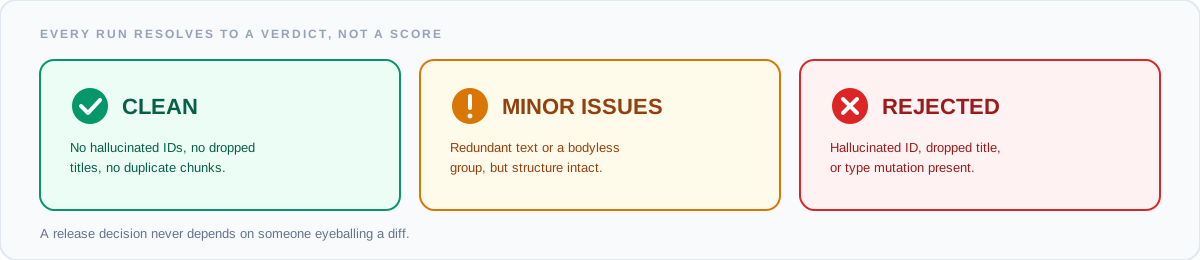
Figure 4 — Every grouped output resolves to one of three verdicts, so a release decision never depends on someone eyeballing a diff.
Financial and insurance PDFs are dense with images that look important and aren't — seals, signatures, decorative letterhead — sitting on the same pages as charts that carry the single most retrieval-relevant fact on the page. The captioning stage has to tell those apart before it spends a single token summarising anything.
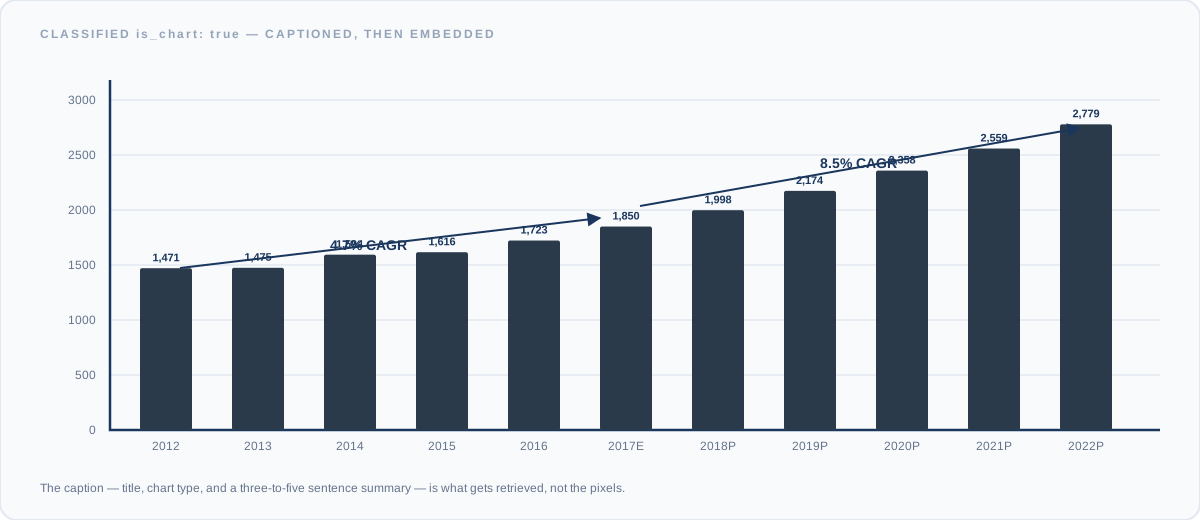
Figure 5 — A chart of the kind extracted from a life-insurance prospectus. The pipeline classifies it is_chart: true and attaches a structured caption — title, chart type, and a 3–5 sentence summary of the figures — which is what actually gets embedded and retrieved, not the raw pixels.
Anything flagged is_chart: false — a signature block, a corporate seal, a stray photograph — is discarded before it reaches the chunk store. That one classification step is the difference between a retrieval index full of genuinely useful captions and one padded with noise that costs money to embed and never gets a useful match.
The documents are still messy. That was never going to change.
What changed is that "does the assistant know about X" stopped being a guess. Three things did that:
The 96.5% cost gap is the number people remember. The more useful result is quieter: the next model swap, prompt change or document type gets measured the same way, on the same harness — instead of someone reading a diff and forming an impression.